该方案基于飞桨PaddleVideo的BMN模型,优化乒乓球时序动作定位。先分析训练集label分布与动作时长,参考Football Vocation调整窗口大小,分割数据为9:1的训练、验证集。训练尝试多种策略,用CustomWarmupCosineDecay提升分数,最终导出模型推理,生成提交文件,获B榜第11名。
☞☞☞AI 智能聊天, 问答助手, AI 智能搜索, 免费无限量使用 DeepSeek R1 模型☜☜☜

本方案基于数个基线方案和PaddleVIdeo官方代码仓进行优化
reference:
使用Paddle实现乒乓球时序动作定位开源方案
使用Football Vocation 分割数据实现乒乓球时序动作定位
数据集的处理:首先通过观察训练集的label分布,研究了动作的平均时长分布;
之后参考了Football Vocation的处理方法,调整窗口大小;
训练:尝试了余弦退火等多种策略,不同的学习率和warmup策略;
尝试了不同的epochs数量。
在众多大规模视频分析情景中,从冗长未经修剪的视频中定位并识别短时间内发生的人体动作成为一个备受关注的课题。当前针对人体动作检测的解决方案在大规模视频集上难以奏效,高效地处理大规模视频数据仍然是计算机视觉领域一个充满挑战的任务。其核心问题可以分为两部分,一是动作识别算法的复杂度仍旧较高,二是缺少能够产生更少视频提案数量的方法(更加关注短时动作本身的提案)。
这里所指的视频动作提案是指一些包含特定动作的候选视频片段。为了能够适应大规模视频分析任务,时序动作提案应该尽可能满足下面两个需求: (1)更高的处理效率,例如可以设计出使时序视频片段编码和打分更高效的机制; (2)更强的判别性能,例如可以准确定位动作发生的时间区间。
本次比赛旨在激发更多的开发者和研究人员关注并参与有关视频动作定位的研究,创建性能更出色的动作定位模型。
本次比赛的数据集包含了19-21赛季兵乓球国际比赛(世界杯、世锦赛、亚锦赛,奥运会)和国内比赛(全运会,乒超联赛)中标准单机位高清转播画面的特征信息,共包含912条视频特征文件,每个视频时长在0~6分钟不等,特征维度为2048,以pkl格式保存。我们对特征数据中面朝镜头的运动员的回合内挥拍动作进行了标注,单个动作时常在0~2秒不等,训练数据为729条标注视频,A测数据为91条视频,B测数据为92条视频,训练数据标签以json格式给出。
本方案采用PaddleVideo中的BMN模型。BMN模型是百度自研,2019年ActivityNet夺冠方案,为视频动作定位问题中proposal的生成提供高效的解决方案,在PaddlePaddle上首次开源。此模型引入边界匹配(Boundary-Matching, BM)机制来评估proposal的置信度,按照proposal开始边界的位置及其长度将所有可能存在的proposal组合成一个二维的BM置信度图,图中每个点的数值代表其所对应的proposal的置信度分数。网络由三个模块组成,基础模块作为主干网络处理输入的特征序列,TEM模块预测每一个时序位置属于动作开始、动作结束的概率,PEM模块生成BM置信度图。
本赛题中的数据包含912条ppTSM抽取的视频特征,特征保存为pkl格式,文件名对应视频名称,读取pkl之后以(num_of_frames, 2048)向量形式代表单个视频特征。其中num_of_frames是不固定的,同时数量也比较大,所以pkl的文件并不能直接用于训练。同时由于乒乓球每个动作时间非常短,为了可以让模型更好的识别动作,所以这里将数据进行分割。
 0G。否则项目会被终止。
%cd /home/aistudio/data/ !wget https://bj.bcebos.com/v1/ai-studio-online/a34561eb976644e79808072528bf6d8bccb3f8d0b20a4d7499af0db282e01d87 -O Features_competition_test_B.tar.gz !tar xf Features_competition_test_B.tar.gz !tar xf data122998/Features_competition_train.tar.gz !tar xf data123004/Features_competition_test_A.tar.gz !cp data122998/label_cls14_train.json . !rm -rf data12*In [2]
import osimport sysimport jsonimport randomimport pickleimport numpy as np
2.下面对数据进行一些分析和观察
In [2]source_path = "/home/aistudio/data/label_cls14_train.json"In [4]
import jsonwith open('/home/aistudio/data/label_cls14_train.json') as f:
    data = json.load(f)
f.close()
In [5]
dura = []for i in range(len(data['gts'])):    for j in range(len(data['gts'][i]['actions'])):        # print(i)
        # print(j)
        dura.append(data['gts'][i]['actions'][j]['end_id']-data['gts'][i]['actions'][j]['start_id'])
观察数据的分布,发现平均值为0.74,最大值为33
In [6]import numpy as npimport pandas as pdimport matplotlib.pyplot as pltimport seaborn as sb %matplotlib inline df = pd.DataFrame(dura) df.describe()
                  0
count  19054.000000
mean       0.735617
std        0.510685
min        0.040000
25%        0.480000
50%        0.600000
75%        0.840000
max       33.200000
可视化数据分布
In [7]sb.distplot(dura, color="b", bins=20, rug=True) sb.distplot(dura, hist=False)
<matplotlib.axes._subplots.AxesSubplot at 0x7f932fc88310>
<Figure size 432x288 with 1 Axes>
去除大于4的数值后的分布
 Openflow
一键极速绘图,赋能行业工作流
 88
查看详情
88
查看详情
 In [8]
mid  = df.median()
df[(df>4)] = np.nan
df.fillna(mid,inplace=True)
df.describe()
sb.distplot(df, color="b", bins=20, rug=True)
sb.distplot(df, hist=False)
<matplotlib.axes._subplots.AxesSubplot at 0x7f9305d8f050>
<Figure size 432x288 with 1 Axes>
#按照9:1划分训练 测试集l=len(data['gts'])
l=int(l*0.1)
val = {'gts': data['gts'][0:l], 'fps': 25}
jsonString = json.dumps(val, indent=4, ensure_ascii=False)
jsonFile = open('/home/aistudio/data/label_cls14_val.json', 'w')
jsonFile.write(jsonString)
jsonFile.close()

train = {'gts': data['gts'][l:], 'fps': 25}
jsonString = json.dumps(train, indent=4, ensure_ascii=False)
jsonFile = open('/home/aistudio/data/label_cls14_train.json', 'w')
jsonFile.write(jsonString)
jsonFile.close()
In [ ]
"""
get instance for bmn
使用winds=4的滑窗,将所有子窗口的长度之和小于winds的进行合并
合并后,父窗口代表bmn训练数据,子窗口代表tsn训练数据
"""import osimport sysimport jsonimport randomimport pickleimport numpy as npimport math# for table tennisbmn_window = 4dataset = "/home/aistudio/data"feat_dir = dataset + '/Features_competition_train'out_dir = dataset + '/Input_for_bmn'label_files = {    'train': 'label_cls14_train.json',    'validation': 'label_cls14_val.json'}global fpsdef gen_gts_for_bmn(gts_data):
    """
    @param, gts_data, original gts for action detection
    @return, gts_bmn, output gts dict for bmn
    """
    fps = gts_data['fps']
    gts_bmn = {'fps': fps, 'gts': []}    for sub_item in gts_data['gts']:
        url = sub_item['url']

        max_length = sub_item['total_frames']

        gts_bmn['gts'].append({            'url': url,            'total_frames': max_length,            'root_actions': []
        })
        sub_actions = sub_item['actions']        # 跳过没有动作的片段
        if len(sub_actions) == 0:            continue
        # duration > bmn_window, 动作持续时间大于bmn_windows,直接删除
        for idx, sub_action in enumerate(sub_actions):            if sub_action['end_id'] - sub_action['start_id'] > bmn_window:
                sub_actions.pop(idx)        # 【滑动窗口,把每一个视频里的动作片段提取出来】
        root_actions = [sub_actions[0]]        # before_id, 前一动作的最后一帧
        # after_id, 后一动作的第一帧
        before_id = 0
        for idx in range(1, len(sub_actions)):
            cur_action = sub_actions[idx]
            duration = (cur_action['end_id'] - root_actions[0]['start_id'])            if duration > bmn_window:  # windows只能包住一个动作就包,包不住就包多个
                after_id = cur_action['start_id']
                gts_bmn['gts'][-1]['root_actions'].append({                    'before_id':
                    before_id,                    'after_id':
                    after_id,                    'actions':
                    root_actions
                })
                before_id = root_actions[-1]['end_id']  #更新滑窗
                root_actions = [cur_action]            else:
                root_actions.append(cur_action)            if idx == len(sub_actions) - 1:
                after_id = max_length
                gts_bmn['gts'][-1]['root_actions'].append({                    'before_id':
                    before_id,                    'after_id':
                    after_id,                    'actions':
                    root_actions
                })    return gts_bmndef combile_gts(gts_bmn, gts_process, mode):
    """
    1、bmn_window 范围内只有一个动作,只取一个目标框
    2、bmn_window 范围内有多个动作,取三个目标框(第一个动作、最后一个动作、所有动作)
    """
    global fps
    fps = gts_process['fps']
    duration_second = bmn_window * 1.0
    duration_frame = bmn_window * fps
    feature_frame = duration_frame    for item in gts_process['gts']:
        url = item['url']
        basename = os.path.basename(url).split('.')[0]
        root_actions = item['root_actions']        # 把每一个视频里的动作片段提取出来
        for root_action in root_actions:
            segments = []            # all actions
            segments.append({                'actions': root_action['actions'],                'before_id': root_action['before_id'],                'after_id': root_action['after_id']
            })            if len(root_action['actions']) > 1:  #如果有多个动作,则第一个动作和最后一个动作,额外添加一次
                # first action
                segments.append({                    'actions': [root_action['actions'][0]],                    'before_id':
                    root_action['before_id'],                    'after_id':
                    root_action['actions'][1]['start_id']
                })                # last action
                segments.append({                    'actions': [root_action['actions'][-1]],                    'before_id':
                    root_action['actions'][-2]['end_id'],                    'after_id':
                    root_action['after_id']
                })            # 把动作片段处理成window size大小,以适配BMN输入
            for segment in segments:
                before_id = segment['before_id']
                after_id = segment['after_id']
                actions = segment['actions']                # before_id到after_id太长了,从里面取window_size帧,要先确定一个起始点,然后动作都要包住
                box0 = max(actions[-1]['end_id'] - bmn_window,
                           before_id)  #确定起始点
                box1 = min(actions[0]['start_id'],
                           after_id - bmn_window)  #确实起始点
                if box0 <= box1:  # 一次检查
                    if int(box0) - int(box1) == 0:
                        cur_start = box0                    else:
                        box0 = math.ceil(box0)
                        box1 = int(box1)
                        cur_start = random.randint(box0, box1)
                    cur_end = cur_start + bmn_window
                    cur_start = round(cur_start, 2)
                    cur_end = round(cur_end, 2)
                    name = '{}_{}_{}'.format(basename, cur_start, cur_end)
                    annotations = []                    for action in actions:
                        label = str(1.0 * action['label_ids'][0])
                        label_name = action['label_names'][0]
                        seg0 = 1.0 * round((action['start_id'] - cur_start),                                           2)  #存储的是到开始位置(时间: s)的距离
                        seg1 = 1.0 * round((action['end_id'] - cur_start), 2)
                        annotations.append({                            'segment': [seg0, seg1],                            'label': label,                            'label_name': label_name
                        })
                    gts_bmn[name] = {                        'duration_second': duration_second,                        'duration_frame': duration_frame,                        'feature_frame': feature_frame,                        'subset': mode,                        'annotations': annotations
                    }    return gts_bmndef s*e_feature_to_numpy(gts_bmn, folder):
    global fps    print('s*e feature for bmn ...')    if not os.path.exists(folder):
        os.mkdir(folder)
    process_gts_bmn = {}
    miss = 0
    for item, value in gts_bmn.items():        # split to rsplit 针对文件命名修改
        basename, start_id, end_id = item.rsplit('_', 2)        if not basename in process_gts_bmn:
            process_gts_bmn[basename] = []
        process_gts_bmn[basename].append({            'name': item,            'start': float(start_id),            'end': float(end_id)
        })    for item, values in process_gts_bmn.items():
        feat_path = os.path.join(feat_dir, item + '.pkl')
        feature_video = pickle.load(open(feat_path, 'rb'))['image_feature']        for value in values:
            s*e_cut_name = os.path.join(folder, value['name'])
            a, b, c = s*e_cut_name.rsplit('_', 2)            if float(b) > 360:                print(b)
            start_frame = round(value['start'] * fps)
            end_frame = round(value['end'] * fps)            if end_frame > len(feature_video):
                miss += 1
                continue
            feature_cut = [
                feature_video[i] for i in range(start_frame, end_frame)
            ]
            np_feature_cut = np.array(feature_cut, dtype=np.float32)
            np.s*e(s*e_cut_name, np_feature_cut)    print('miss number (broken sample):', miss)if __name__ == "__main__":    if not os.path.exists(out_dir):
        os.mkdir(out_dir)
    gts_bmn = {}    for item, value in label_files.items():
        label_file = os.path.join(dataset, value)
        gts_data = json.load(open(label_file, 'rb'))
        gts_process = gen_gts_for_bmn(gts_data)
        gts_bmn = combile_gts(gts_bmn, gts_process, item)    with open(out_dir + '/label.json', 'w', encoding='utf-8') as f:
        data = json.dumps(gts_bmn, indent=4, ensure_ascii=False)
        f.write(data)

    s*e_feature_to_numpy(gts_bmn, out_dir + '/feature')
In [ ]
import copyimport jsonimport reimport os

url = '/home/aistudio/data/Input_for_bmn/feature/'directory = os.fsencode(url)
count = 0target_set = []for file in os.listdir(directory):
    filename = os.fsdecode(file)
    target_name = filename.split('.npy')[0]
    target_set.append(target_name)
    count += 1print('Feature size:', len(target_set))with open('/home/aistudio/data/Input_for_bmn/label.json') as f:
    data = json.load(f)

delet_set = []for key in data.keys():    if not key in target_set:
        delet_set.append(key)print('(Label) Original size:', len(data))print('(Label) Deleted size:', len(delet_set))for item in delet_set:
    data.pop(item, None)print('(Label) Fixed size:', len(data))

jsonString = json.dumps(data, indent=4, ensure_ascii=False)
jsonFile = open('/home/aistudio/data/Input_for_bmn/label_fixed.json', 'w')
jsonFile.write(jsonString)
jsonFile.close()
执行完毕后,在data/Input_for_bmn/目录中生成了新的标注文件label_fixed.json。同时删除不必要的原始文件,降低空间占用
In [ ]!rm /home/aistudio/data/Features_competition_train/*.pkl
执行后在data/Features_competition_train/npy目录下生成了训练用的numpy数据。
In [ ]import osimport os.path as ospimport globimport pickleimport paddleimport numpy as np
file_list = glob.glob("/home/aistudio/data/Features_competition_test_A/*.pkl")
max_frames = 9000npy_path = ("/home/aistudio/data/Features_competition_test_A/npy/")if not osp.exists(npy_path):
os.makedirs(npy_path)for f in file_list:
video_feat = pickle.load(open(f, 'rb'))
tensor = paddle.to_tensor(video_feat['image_feature'])
pad_num = 9000 - tensor.shape[0]
pad1d = paddle.nn.Pad1D([0, pad_num])
tensor = paddle.transpose(tensor, [1, 0])
tensor = paddle.unsqueeze(tensor, axis=0)
tensor = pad1d(tensor)
tensor = paddle.squeeze(tensor, axis=0)
tensor = paddle.transpose(tensor, [1, 0])
sps = paddle.split(tensor, num_or_sections=90, axis=0) for i, s in enumerate(sps):
file_name = osp.join(npy_path, f.split('/')[-1].split('.')[0] + f"_{i}.npy")
np.s*e(file_name, s.detach().numpy()) pass
数据集分割好之后,可以开始训练模型,使用以下命令进行模型训练。首先需要安装PaddleVideo的依赖包。
In [ ]# 从Github上下载PaddleVideo代码!git clone https://github.com/PaddlePaddle/PaddleVideo.gitIn [ ]
%cd /home/aistudio/PaddleVideo/
!pip install -r requirements.txt
开始训练模型
config文件位于/home/aistudio/model/bmn.yaml
训练时的恢复训练这一参数参考了官方repo,需要在训练时指定 -o参数,同时在config文件中指定resume_from的模型权重位置
训练截图:
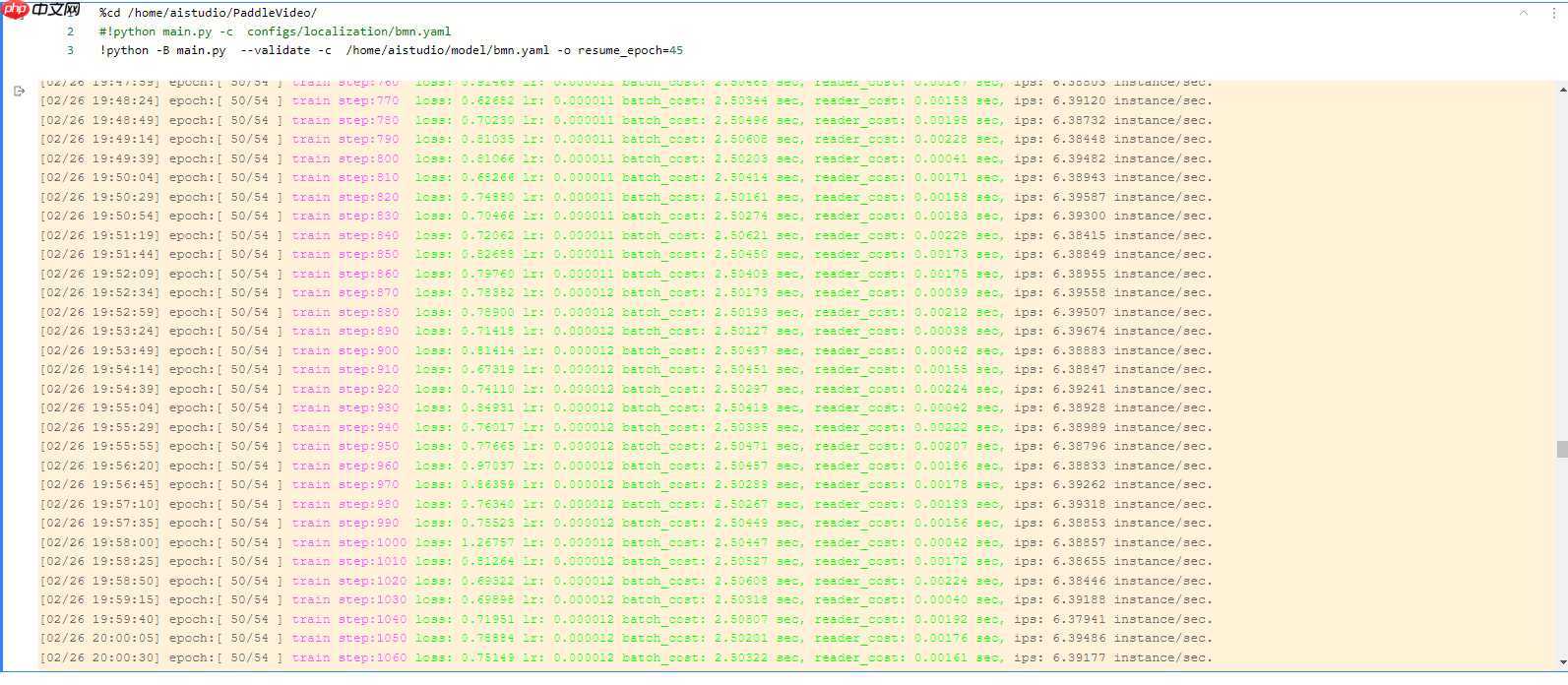
最终用于比赛提交的模型权重是第50个,位置是/home/aistudio/model/BMN_epoch_00050.pdparams
训练时采用了不同的batdch_size策略,提升不大
采用了不同的学习率策略:https://github.com/PaddlePaddle/PaddleVideo/blob/develop/paddlevideo/solver/custom_lr.py
使用CustomWarmupCosineDecay比直接decay的a榜分数提高了0.5左右
In [ ]%cd /home/aistudio/PaddleVideo/#!python main.py -c configs/localization/bmn.yaml!python -B main.py --validate -c /home/aistudio/model/bmn.yaml -o resume_epoch=45
将训练好的模型导出用于推理预测,执行以下脚本。
In [ ]%cd /home/aistudio/PaddleVideo/ !python tools/export_model.py -c configs/localization/bmn.yaml -p /home/aistudio/model/BMN_epoch_00050.pdparams -o inference/BMN
使用导出的模型进行推理预测,执行以下命令。
In [ ]%cd /home/aistudio/PaddleVideo/# !python tools/predict.py --input_file /home/aistudio/data/Features_competition_test_A/npy \!python tools/predict.py --input_file /home/aistudio/data/Features_competition_test_B/npy \ --config configs/localization/bmn.yaml \ --model_file inference/BMN/BMN.pdmodel \ --params_file inference/BMN/BMN.pdiparams \ --use_gpu=True \ --use_tensorrt=False
上面程序输出的json文件是分割后的预测结果,还需要将这些文件组合到一起。执行以下脚本:
In [ ]import osimport jsonimport glob# json_path = "/home/aistudio/data/Features_competition_test_A/npy/"json_path = "/home/aistudio/data/Features_competition_test_B/npy/"json_files = glob.glob(os.path.join(json_path, '*_*.json'))In [ ]
submit_dic = {"version": None,              "results": {},              "external_data": {}
              }
results = submit_dic['results']for json_file in json_files:
    j = json.load(open(json_file, 'r'))
    old_video_name = list(j.keys())[0]
    video_name = list(j.keys())[0].split('/')[-1].split('.')[0]
    video_name, video_no = video_name.split('_')
    start_id = int(video_no) * 4
    if len(j[old_video_name]) == 0:        continue
    for i, top in enumerate(j[old_video_name]):        if video_name in results.keys():
            results[video_name].append({'score': round(top['score'], 2),                                        'segment': [round(top['segment'][0] + start_id, 2), round(top['segment'][1] + start_id, 2)]})        else:
            results[video_name] = [{'score':round(top['score'], 2),                                        'segment': [round(top['segment'][0] + start_id, 2), round(top['segment'][1] + start_id, 2)]}]

json.dump(submit_dic, open('/home/aistudio/submission.json', 'w', encoding='utf-8'))
最后会在用户目录生成submission.json文件,压缩后下载提交即可。
In [ ]%cd /home/aistudio/ !zip submission.zip submission.json
/home/aistudio
  adding: submission.json (deflated 91%)
以上就是基于飞桨实现乒乓球时序动作定位大赛-b榜第11名方案的详细内容,更多请关注其它相关文章!
# 中文网
# 企业推广营销渠道
# 都匀国外网站推广公司
# 武汉大学信息建设网站
# 巫溪县可靠网站建设
# 福州晋安网站seo优化公司
# 上海移动网站设计推广
# 庆元租房网站建设
# 云龙区创新网站建设优势
# 商丘百度网站优化哪里好
# 江门网站建设专业品牌
# 开源
# 起始点
# 采用了
# 第一个
# 成了
# python
# 多个
# 一言
# 时长
# fig
# udio
# 视频时长
# 征信
# igs
# red
# cos
# 可视化数据
# 百度
# ai
# windows
# git
相关栏目:
【
Google疑问12 】
【
Facebook疑问10 】
【
优化推广96088 】
【
技术知识133117 】
【
IDC资讯59369 】
【
网络运营7196 】
【
IT资讯61894 】
相关推荐:
游族AI创新院揭牌成立 推进AI赋能游戏业务
科技数码圈的新物种 乐天派桌面机器人 AI +安卓+机器人 首发价1799元
央广车联网亮相2025世界人工智能大会
AI大模型紫东太初已被注册商标 中科院已注册紫东太初大模型商标
1.6亿美元收购Singularity AI,昆仑万维布局通用人工智能
国内首款大尺寸仿鸵双足机器人“大圣”亮相,穿戴红色战袍
新华社联合北大发布AI大模型评测:安全可靠成重点,360智脑表现优异
当人工智能开始写高考作文?作家陈崇正、朱山坡谈文学与未来
多家欧洲企业签署公开信,批评欧盟 AI 法案草案限制产业发展
无需标注数据,「3D理解」进入多模态预训练时代!ULIP系列全面开源,刷新SOTA
联想举办2025创新开放日,展出260余项算力及AI产品技术
科技赋能司法执行 阿里资产免费为全国法院升级VR新服务
先进技术在防止全球数据丢失方面的作用
Meta发布"类人"AI图像创建模型,能解决多出手指等Bug
京东 AI 大模型官宣 7 月 13 日发布,还有重磅合作
图像生成过程中遭「截胡」:稳定扩散的失败案例受四大因素影响
上海发布“元宇宙关键技术攻关行动方案”,加快 AIGC 等突破
脑机接口产业联盟发布十大脑机接口关键技术
V社谈AI制作游戏被ban:为确保开发者有素材所有权
探索人工智能在居家养老方面的应用
移远通信率先完成多场5G NTN技术外场验证,为卫星物联网应用落地提速
谷歌计划在上海举办开发者大会,重点关注机器学习和生成式AI领域
百亿量化私募:量化投资进入“精耕细作”时代 AI带来行业新变革
360发布认知型通用大模型“360智脑4.0” 全面接入360全家桶
小米9号员工李明宣布创业:打造首款安卓桌面机器人
一句话搞定数据分析,浙大全新大模型数据助手,连搜集都省了
人工智能产业竞跑“未来赛道” 创新发展放大“赋能”效应
微软在德国举办MR研讨会,向女性分享元宇宙潜力
特斯拉 Optimus 人形机器人入驻北美门店,帮助提升汽车销量
Zoom远程会议应用:AI培训需经用户授权
“黑科技”亮相大湾区轨交论坛 智慧交通迈向“强AI”
AI室内设计软件流行,室内设计行业如何应对效率变革
深圳人工智能企业超1900家
探展WAIC | 第四范式“式说”聚焦toB大模型,布局生成式AI重构企业软件
AYANEO AIR 1S 掌机发布:R7 7840U,预订价 4699 元起
首家承认ChatGPT影响其收入的公司Chegg选择拥抱AI ,裁减4%员工
云南首例达芬奇机器人微创心脏手术成功开展
猿编程参加人工智能高峰论坛,推动人工智能教育解决方案在千所学校推行
美妆行业在AI时代蓬勃发展
百度创始人、董事长兼首席执行官李彦宏:AI原生应用比大模型数量更重要
阿里云推出通义万相AI绘画大模型
马斯克发推讽刺人工智能,机器学习本质是统计?
标小智LOGO推出AI公司起名生成器“Name.GPT”
卫星通信牵引物联网竞争升维,模组厂商如何决胜百亿市场?
一文看懂被英伟达看中的九号机器人移动底盘
中国移动主导创立元宇宙产业联盟,包括科大讯飞、芒果TV等在内,共24家成员
参议院司法听证会:AI 不易管控,有可能被恶意分子利用来研发生化武器
云深处与昇腾CANN携手合作:开设ROS四足机器狗开发训练营
南京制造的国产工业机器人:在外资品牌竞争中突围,年销售1.8万台
用AI升级会议体验!思必驰多款会议产品亮相全球智博会!
2025-08-01

运城市盐湖区信雨科技有限公司是一家深耕海外推广领域十年的专业服务商,作为谷歌推广与Facebook广告全球合作伙伴,聚焦外贸企业出海痛点,以数字化营销为核心,提供一站式海外营销解决方案。公司凭借十年行业沉淀与平台官方资源加持,打破传统外贸获客壁垒,助力企业高效开拓全球市场,成为中小企业出海的可靠合作伙伴。
